Radio FM
- 4.4
- Rating
- 100.00M
- Installs
- Free
- Price
 Analysis by App-foxy
I approached Radio FM as the kind of app you open when you want audio immediately, without first building a playlist or choosing a single subscription service. It is a free Music & Audio app from RadioFM that brings radio, drama, and podcasts into one listening space. That combination makes it more flexible than a simple station directory, although it also means the experience depends on what you want to hear at a particular moment.
My first impression was that its appeal is practical rather than flashy. You can use it for background listening while preparing breakfast, follow spoken programs during a commute, or switch from live radio to longer-form audio when you want something more deliberate. It is aimed at Teen users, and its broad audience is reflected in its scale: the app has passed 100 million installs and holds a 4.4 average from around one million ratings. Those figures do not guarantee that every station or program will suit you, but they do suggest that Radio FM has become a familiar option for people who want several kinds of audio in one place.
What to expect before you start listening
The most useful way to think about Radio FM is as a listening hub, not as a replacement for every specialized audio service. Traditional radio remains its natural starting point, especially if you enjoy the surprise of joining a broadcast already in progress. Drama and podcasts broaden the choice, giving you something to select when live programming does not match your mood.
You May Also Like

 AccuWeather: Weather Radar
AccuWeather Review: A Quick, Clear Forecast for Everyday Decisions
For everyday plans, the best forecast is the one you can understand quickly. AccuWeather makes rain timing, radar, and local conditions easy to act on, with a few trade-offs.

 Hill Climb Racing
Why Hill Climb Racing Still Turns Crashes Into One More Run
A tiny car, a bumpy hill and one more upgrade: Hill Climb Racing keeps resurfacing because its simple chaos makes every near-miss feel personal.

 AliExpress - Shopping App
AliExpress Makes Global Shopping Feel Personal, but Shoppers Bear the Risk
AliExpress turns a global marketplace into a pocket-sized discovery engine. Its reach is useful, its shopping loop compelling, and its trade-offs easy to miss.

 Lords Mobile: Kingdom Wars
Lords Mobile Is a Kingdom-Building Routine, Not a Quick Match
A case-by-case verdict on the building, battles, device demands, and social commitments that make Lords Mobile rewarding for some players and exhausting for others.

 PDF Scanner app - TapScanner
TapScanner Makes Paperwork Easier to Capture, Check, and Share
TapScanner makes scanning with a phone feel less like a rescue operation and more like a dependable step in getting work done. Its capture tools are useful, though not flawless.

 Block Blast!
 Shows How Much a Puzzle Game Can Leave Out
A quiet grid game shows why puzzle players increasingly value instant clarity, repeatable skill and low-pressure play—and where the genre still needs to catch up.
More From Our News Desk
View All News


That difference matters. A music subscription app usually revolves around albums, artists, playlists, and on-demand control. Radio FM is more suitable when you want to browse stations, discover a broadcast, or let a program guide your listening. If you already know the exact song you want, a dedicated music service will normally be more direct. If you want a local station, a talk program, or an audio story without moving between several apps, this one makes more sense.
I also found that the app works best when I treated it as a place for quick audio decisions. Instead of spending several minutes designing a queue, I could choose a station or program and start listening. That is a small advantage, but it becomes noticeable during ordinary moments: washing dishes, waiting for an appointment, or taking a short walk when silence feels dull but active browsing feels like too much effort.
Because it combines different formats, the interface may initially feel broader than expected. A first-time user could reasonably wonder whether to begin with radio, drama, or podcasts. My advice is not to explore everything at once. Start with the format closest to your current habit, then use the other sections as alternatives rather than obligations.
Installing it without overthinking the choice
Radio FM is free to install, which makes testing it straightforward. The app includes in-app purchases ranging from $0.49 to $41.99 per item, so I would still pay attention to any purchase prompt and avoid assuming that every optional element is included at no cost. For basic evaluation, there is no reason to commit financially before you know whether its stations and programs fit your routine.
The developer is RadioFM, and the app has been available since March 21, 2013. That long presence helps explain why it feels like an established radio product rather than a temporary experiment. It also means a new user should approach it with realistic expectations: the main value is dependable access to varied audio, not necessarily a modern, highly personalized music-discovery system.
After installation, I recommend opening the app at a time when you can spend a few quiet minutes exploring. The first meaningful success should be simple: find one station or spoken program that you would genuinely return to. That is a better test than judging the app by how many choices it presents.
Setting up a useful listening routine
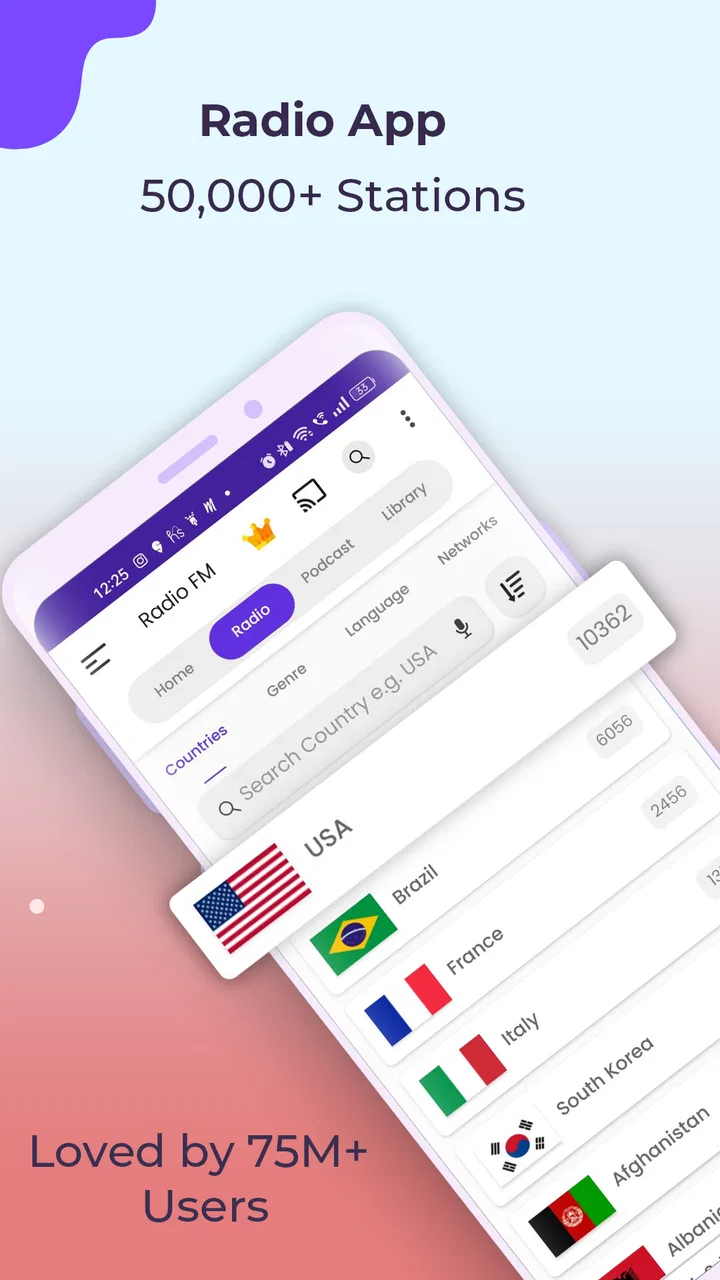
The initial setup is less about filling in a profile and more about learning how the content is organized. I began by looking for a familiar type of radio rather than searching randomly. If you already have a preferred station or genre, use that as your anchor. Recognizing something familiar makes it easier to understand the controls and decide whether the audio starts quickly enough for your needs.
Once you find an appealing option, keep track of it in whatever personal way the app allows, rather than repeatedly scanning the entire catalog. The practical lesson is that discovery and daily use are different activities. Exploration can be broad on the first day, but a useful routine should become narrow: a few dependable choices for mornings, travel, or evening listening.
One workflow I found helpful was to separate live listening from intentional listening. For live radio, I wanted a station that could run in the background without constant decisions. For podcasts or drama, I preferred choosing something before starting, because spoken content is harder to dip into casually. This simple distinction prevented me from blaming the app when the real problem was choosing the wrong format for the moment.
Another worthwhile habit is to test the app in the places where you actually plan to use it. A station that feels ideal at home may not suit a noisy commute, while a talk program that works during a walk may be distracting when you are working. Radio FM is most useful when you judge it by your daily context, not by a short burst of browsing on a quiet screen.
Your first successful action
For a new user, success should mean starting audio and knowing how to return to it later. I would choose one station or program, listen long enough to decide whether the sound and pace fit, then explore the nearby options instead of jumping across the entire app. This gives you a clear answer to the most important question: can Radio FM provide something you want to hear without making the process feel like work?
A realistic example is a weekday morning. I might open the app while making coffee, choose a familiar radio station, and let it provide a mix of music or conversation while I get ready. On another day, I might switch to a podcast for a more focused listening session. The advantage is not that one app magically improves the morning; it is that I can move between live and on-demand-style spoken content without changing my whole audio routine.
When browsing podcasts or drama, I suggest judging the opening minutes carefully. If the subject or presentation does not hold your attention, move on rather than assuming you need to search through every available option. Radio FM rewards quick sampling. Its breadth is valuable only when you use it to find a small set of content that feels personally relevant.
My practical tip is to create a “default choice” in your mind before you need it. Pick one station for background listening and one spoken option for focused listening. That removes the most common source of friction: opening the app with no idea what to select, then leaving before anything starts.
Where the app differs from ordinary alternatives
Compared with a dedicated radio app, Radio FM’s inclusion of drama and podcasts gives it a wider role. You do not have to treat live radio as your only option. That is helpful for people whose listening changes throughout the day, especially those who want casual broadcasts in one situation and structured spoken content in another.
Compared with a music streaming service, however, it is less compelling for precise control. If your priority is selecting a particular track, arranging a detailed playlist, or staying within a carefully defined artist catalog, a music-first alternative will likely feel more efficient. Radio FM’s strength is the feeling of entering a channel or program, not controlling every second of the session.
It also differs from podcast-only apps. A specialist podcast app may offer a more focused workflow for following a large number of shows, while Radio FM is attractive when podcasts are one part of a broader audio habit. I would choose Radio FM for variety and convenience, not because it necessarily replaces every feature a specialist listener might expect.
Common points of confusion during everyday use
The biggest adjustment is understanding that not all audio behaves the same way. Live radio has its own schedule and rhythm, while drama and podcasts are easier to approach as selected programs. If you expect every item to work like an on-demand song, the app may feel inconsistent. Once you accept the difference between broadcast discovery and chosen playback, the structure becomes easier to navigate.
Another possible frustration is choice overload. A large audio catalog sounds positive, but it can make the first session feel less personal. I would resist the temptation to keep searching for a perfect station. Choose something reasonably close to your interest, listen for a while, and use that experience to refine your next choice. The app becomes more useful when browsing leads to a routine instead of becoming the routine.
There is also a trade-off between convenience and specialization. Having radio, drama, and podcasts together reduces app switching, but it may not provide the deepest tools for each format. Someone who listens to podcasts all day and carefully manages subscriptions may prefer a dedicated podcast platform. Someone who wants a huge, highly controlled music library may prefer a music streaming service. Radio FM is strongest for the person who values variety in one place more than maximum control in one category.
I would also be selective about optional purchases. Since the app is free but offers in-app items, read each prompt before confirming anything. A first-time user does not need to buy something simply because it appears during exploration. Spend time understanding the basic listening experience first, then decide whether any optional addition is genuinely useful to you.
For people concerned about age suitability, the app carries a Teen content rating. That is worth keeping in mind if a younger family member might use the device. The rating does not tell you whether every individual broadcast will match your personal preferences, so I would still use ordinary judgment when choosing programs for shared listening.
Small habits that make the experience better
My first recommendation is to use a two-stage search. Begin broadly by choosing the kind of audio you want, then narrow down by the subject, style, or station that sounds closest. Searching with a precise expectation from the start can be disappointing when you are really in the mood for discovery.
Second, give spoken content a different test from music. A radio station can work as background audio within moments, but a drama or podcast may need more attention before you know whether it is worth continuing. I found it more useful to ask whether the presenter, story, or subject suited the situation than to judge all audio by the same standard.
Third, use the app according to the length of your available time. For a short break, live radio is often the easiest choice because it requires little preparation. For a longer walk or household task, a podcast or drama can provide a more coherent listening session. This is a simple but non-obvious advantage of having the formats together: the choice can follow your schedule rather than forcing your schedule to follow one type of content.
Finally, keep expectations realistic when comparing sound and control with premium music services. Radio FM can be convenient and broad, but its purpose is not identical. If you are evaluating it only by whether it behaves like a playlist app, you may miss what it does well. Evaluate it by how quickly it helps you find something listenable when you do not want to manage a full music library.
Who should use Radio FM, and who should skip it?
I would recommend Radio FM to someone who enjoys live broadcasts, wants spoken audio available alongside radio, and prefers not to maintain several separate apps. It is especially suitable for casual listeners who want a dependable source of sound during everyday tasks. The app also makes sense for people who enjoy discovering programs rather than deciding every detail in advance.
I would be more cautious about recommending it to a listener with a very specific requirement. If you need exact song selection, advanced playlist management, or a highly organized podcast-following system, another category of app may serve you better. The same applies if you dislike browsing and want every session to begin with a precise, known track or episode.
It may also be a poor fit for someone who expects every station to match their taste immediately. Radio is inherently variable, and the app’s broad selection cannot remove the need to explore. The best experience comes from accepting a little trial and error, then returning to the choices that prove useful.
For me, the deciding factor is convenience. I would keep it installed if I regularly moved between live radio and spoken programs. I would skip it if my listening were almost entirely based on carefully curated music playlists. That distinction is more important than the impressive install count, because popularity does not change the app’s central trade-off between breadth and specialized control.
My final take after building a routine
Radio FM succeeds because it makes several kinds of audio available through one straightforward destination. Its free entry point, established developer, and wide reach make it easy to try, while the combination of radio, drama, and podcasts gives it more everyday flexibility than a basic station-only tool. I especially like it for moments when I want sound quickly but do not want to decide on a full album or playlist.
The app is not perfect for every listener. Its broad selection can require patience, and people who want deep control over music or podcasts may find specialized alternatives more satisfying. The in-app purchase range also means I would read prompts carefully rather than assuming every optional element is part of the free experience.
My suggested path is simple: install it, choose one familiar radio option, and make sure you can return to it easily. Then test one drama or podcast when you have enough time to listen properly. If those two use cases fit naturally into your day, Radio FM can become a practical audio companion rather than another app you open once and forget. Its real strength is flexible listening with minimal commitment, and that is exactly why I would recommend giving it a fair trial to anyone who wants more than a single kind of audio in one place.
FAQs for Radio FM
01What features does Radio FM offer?
Radio FM provides users with access to thousands of radio stations from around the world, offering a diverse range of music genres, news broadcasts, and talk shows. The app includes a user-friendly interface, easy navigation, and features like favorites, sleep timer, and alarm options to enhance the listening experience.
02Is Radio FM free to use, or does it require a subscription?
Radio FM is free to download and use, providing access to a wide variety of radio stations without any subscription. However, the app may contain advertisements. Users can opt for in-app purchases or a premium version to enjoy an ad-free experience and additional features.
03Can I listen to Radio FM offline?
Radio FM primarily streams content live, which requires an internet connection. It does not support offline listening, as it is designed to provide real-time access to radio broadcasts. Users should ensure they have a stable internet connection, whether Wi-Fi or mobile data, for uninterrupted streaming.
04How does Radio FM handle personalization and station recommendations?
Radio FM allows users to personalize their experience by marking favorite stations and creating a personalized list. The app may also offer recommendations based on listening history and preferences, helping users discover new stations and content tailored to their tastes.
05Is Radio FM compatible with all devices?
Radio FM is available for both Android and iOS devices, supporting a wide range of smartphones and tablets. Users should check the app’s compatibility with their device’s operating system version to ensure optimal performance. Regular updates also help maintain compatibility with the latest devices.
Pros
- Wide range of global stations available.
- User-friendly and intuitive interface.
- Sleep timer for convenient listening.
- Option to save favorite stations.
- Works well on both Wi-Fi and mobile data.
Cons
- Contains occasional ads during use.
- Some stations may buffer on slow internet.
- No offline listening option available.
- Limited customization for station lists.
- App can drain battery on prolonged use.

Radio FM
Gallery